BitHive Reporting Desk
Software for Article 14 of the Cyber Resilience Act. It checks your SBOMs, alerts your team, runs the reporting clocks and prepares the text of each report. You submit it to ENISA yourself.
Reporting obligations
How it works
From SBOM upload to report draft in six steps.
Step 1 of 6
Set up
Sign in with a link sent by e-mail, accept the Terms and the data processing agreement, name who gets alerted, connect Slack, Microsoft Teams or a webhook, and add your product. Four roles: Owner, Administrator, Member, Viewer.
Step 2 of 6
Upload SBOMs
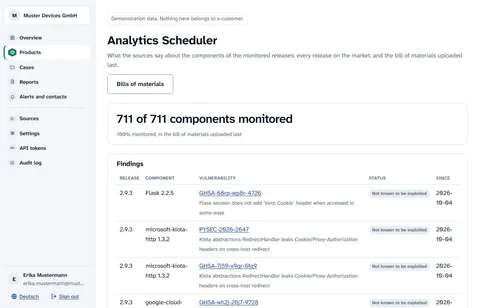
Upload your SBOMs in CycloneDX or SPDX JSON through the web interface or the API, with upload tokens limited to one product. Up to 25 monitored releases per product.
Step 3 of 6
Alert
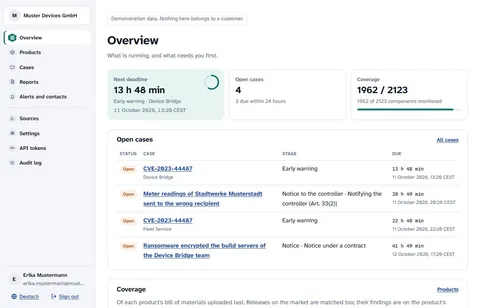
Every hour, each monitored release is checked for actively exploited vulnerabilities listed by CISA KEV and ENISA EUVD, matched with OSV advisory data to its npm, PyPI, Maven, Go and NuGet components.
Alerts go by e-mail to the contacts you name and to Slack, Microsoft Teams or a signed webhook.
Choose per channel: every alert, only the urgent ones, or only when a case opens.
Step 4 of 6
Case and clocks
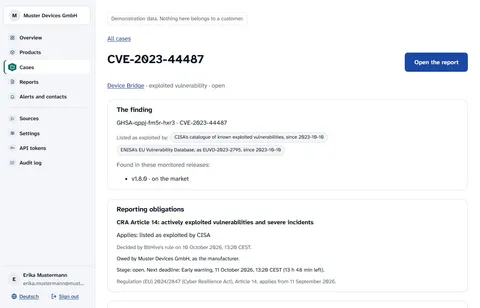
The Article 14 clocks for actively exploited vulnerabilities and severe incidents are computed from the time you became aware and shown in UTC. Each case keeps an append-only audit trail of who knew what, when: the alert, who opened it and who acknowledged it.
Step 5 of 6
Report draft
Guided forms prepare the text of each report with the fields and field limits of ENISA’s single reporting platform (ENISA SRP glossary v1.4 of 1 October 2026), and each field can be copied on its own. You submit it to ENISA yourself, and the submission time and reference are recorded.
Step 6 of 6
Export
Download everything: one archive with your account data, every document as it arrived, the findings, the cases with their deadlines and reports, and the complete audit trail.
At a glance
- SBOM formats
- CycloneDX JSON, SPDX JSON
- Upload
- Web interface or API, product-scoped tokens
- Ecosystems matched
- npm, PyPI, Maven, Go, NuGet
- Exploitation sources
- Hourly checks for actively exploited vulnerabilities (CISA KEV, ENISA EUVD), matched with OSV advisory data to npm, PyPI, Maven, Go and NuGet components
- Alert channels
- Alerts by e-mail to the contacts you name and to Slack, Microsoft Teams or a signed webhook
- Clocks
- Article 14, for actively exploited vulnerabilities and severe incidents, in UTC
- Report drafts
- Fields and field limits of ENISA’s single reporting platform (glossary v1.4 of 1 October 2026)
- Evidence
- Append-only audit trail; full export
- Roles
- Owner, Administrator, Member, Viewer
- Hosting
- Germany
- Contract notification clocks (add-on)
- You record the incident-notice duties from your own contracts. When an incident triggers one, BitHive calculates its deadline where a period is recorded, sends alerts and reminders, drafts the notice and records it once you mark it as sent. You send the notice yourself. Annex, Section 5
Integrations
Alerts go where your team works, and your build pipeline sends SBOMs through the API.
Slack and Microsoft Teams
Alerts post to a Slack channel or to Microsoft Teams through a webhook you create there. No login is needed to read them.
Signed webhook
Alerts as signed JSON to an address of your own, for the system your team works in.
E-mail
Alerts go by e-mail to the contacts you name and to Slack, Microsoft Teams or a signed webhook.
SBOM upload API
Upload SBOMs from your build pipeline with an upload token limited to one product. Every endpoint is documented, with a curl example to copy.
Choose per channel: every alert, only the urgent ones, or only when a case opens.
API referenceSecurity
The application and customer data are hosted in Germany. We work from the SBOMs you upload; we never see your source code.
Security and sub-processorsYour first thirty minutes
Sign in, name who gets alerted, add a product, upload an SBOM.